Year
2025
Client
Me!
Category
User Research
Role
UX/UI Designer
Year
2025
Category
User Research
Client
Me!
Role
UX/UI Designer
Year
2025
Client
Me!
Category
User Research
Role
UX/UI Designer
Overview
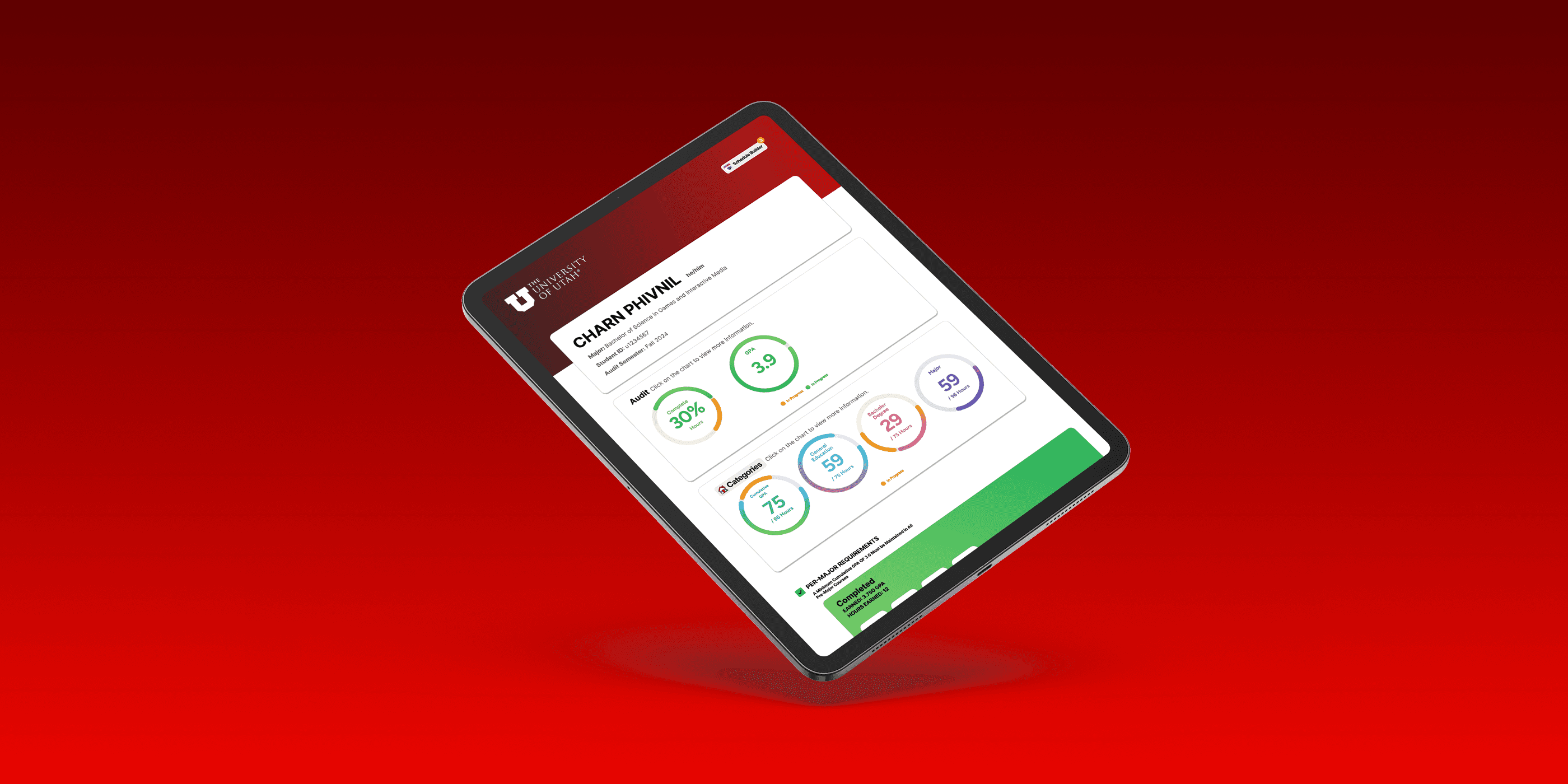
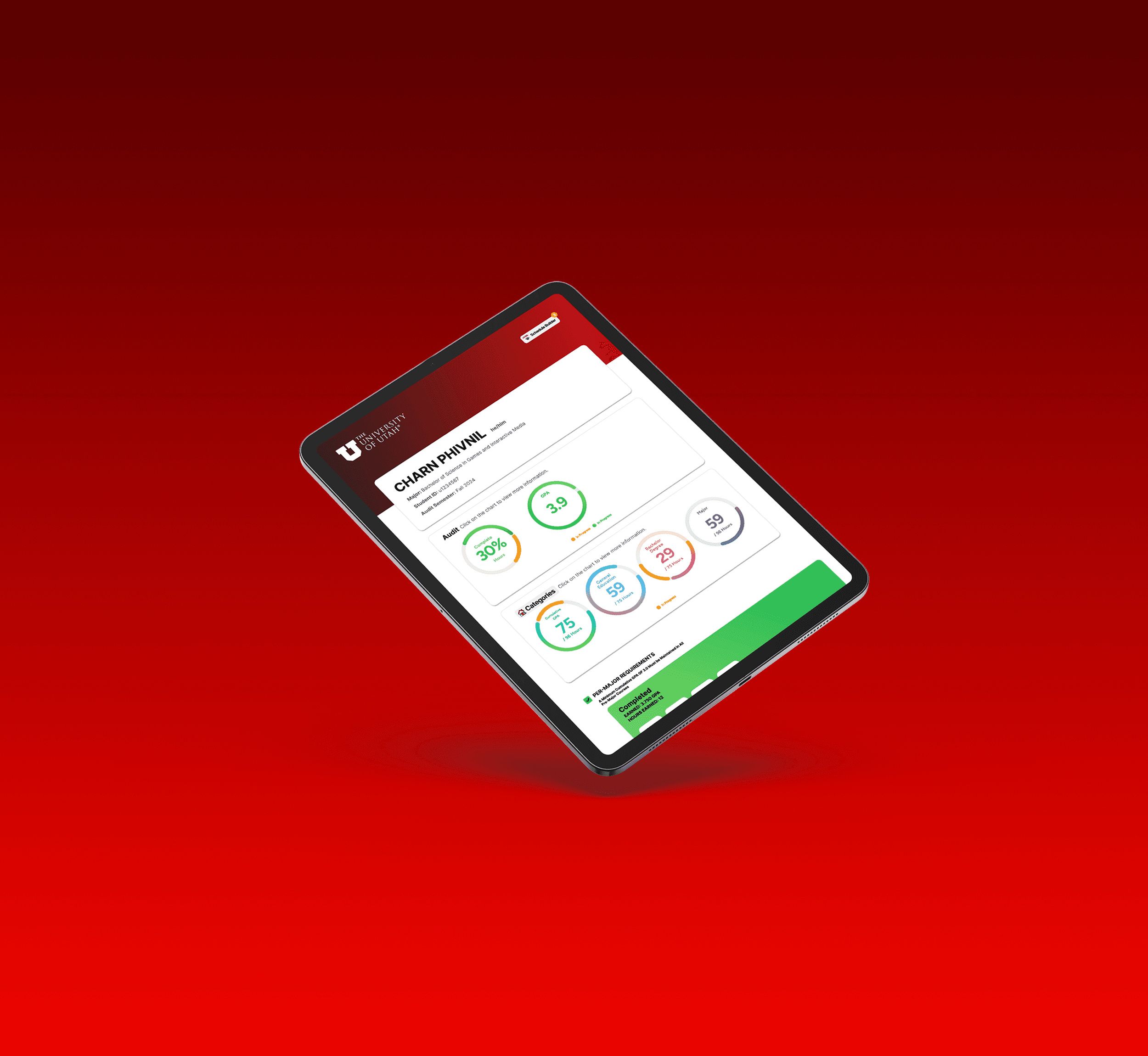
I started this project after noticing that many of my friends struggled with the University of Utah's enrollment website. The design was so confusing that one international student I know accidentally took the same Gen-Ed requirements twice. I decided to design a better version of the Degree Audit where everything happens in one place. My redesign simplifies the process so students can see exactly what they need and register for classes without ever leaving the tab.
Overview
I started this project after noticing that many of my friends struggled with the University of Utah's enrollment website. The design was so confusing that one international student I know accidentally took the same Gen-Ed requirements twice. I decided to design a better version of the Degree Audit where everything happens in one place. My redesign simplifies the process so students can see exactly what they need and register for classes without ever leaving the tab.
Overview
I started this project after noticing that many of my friends struggled with the University of Utah's enrollment website. The design was so confusing that one international student I know accidentally took the same Gen-Ed requirements twice. I decided to design a better version of the Degree Audit where everything happens in one place. My redesign simplifies the process so students can see exactly what they need and register for classes without ever leaving the tab.
What I Learned
I strengthened my technical skills by teaching myself Figma to translate dense, legacy academic records into a high-fidelity, interactive prototype.
I strengthened my ability to manage dense information by redesigning text-heavy academic records into a scannable, visual dashboard that significantly reduces cognitive load.
What I Learned
I strengthened my technical skills by teaching myself Figma to translate dense, legacy academic records into a high-fidelity, interactive prototype.
I strengthened my ability to manage dense information by redesigning text-heavy academic records into a scannable, visual dashboard that significantly reduces cognitive load.
What I Learned
I strengthened my technical skills by teaching myself Figma to translate dense, legacy academic records into a high-fidelity, interactive prototype.
I strengthened my ability to manage dense information by redesigning text-heavy academic records into a scannable, visual dashboard that significantly reduces cognitive load.
Testing & Survey
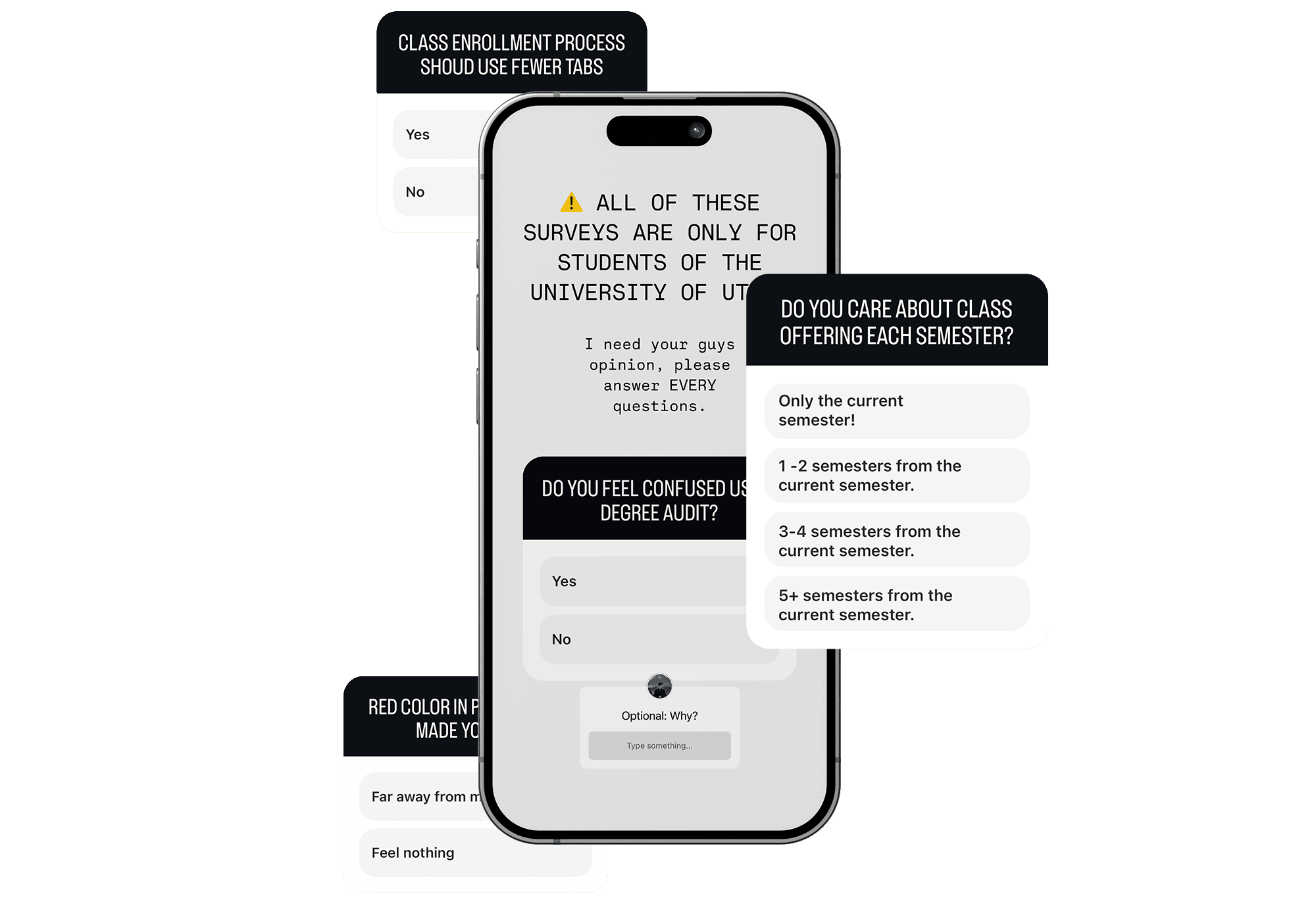
I bypassed traditional tools like Google Forms and used Instagram Story Polls to achieve a significantly higher response rate.
Because students often avoid official platforms like Google Forms that require personal information like university IDs, I needed a more accessible approach. By targeting my University of Utah student followers with a simple tap-based interface, I bypassed typical survey fatigue and secured a high response rate with reliable outcomes.
Testing & Survey
I bypassed traditional tools like Google Forms and used Instagram Story Polls to achieve a significantly higher response rate.
Because students often avoid official platforms like Google Forms that require personal information like university IDs, I needed a more accessible approach. By targeting my University of Utah student followers with a simple tap-based interface, I bypassed typical survey fatigue and secured a high response rate with reliable outcomes.
Testing & Survey
I bypassed traditional tools like Google Forms and used Instagram Story Polls to achieve a significantly higher response rate.
Because students often avoid official platforms like Google Forms that require personal information like university IDs, I needed a more accessible approach. By targeting my University of Utah student followers with a simple tap-based interface, I bypassed typical survey fatigue and secured a high response rate with reliable outcomes.
67
67
67
University of Utah Students participated in this survey.
97%
97%
97%
of students agree that the class enrollment process should use fewer tabs.
89%
89%
89%
of students indicated that they are not concerned with class offerings beyond three semesters from the current term.
83.4%
83.4%
83.4%
of students primarily focus on the classes offered for the upcoming semester.
56.7%
56.7%
56.7%
of students feel confused by the Degree Audit due to the cluttered presentation of information.
31.5%
31.5%
31.5%
of students feel that the red color in the progress bar gives the impression that they are far from graduating, especially during their first year.
Example of Survey Questions
Main Design Goals
Students can track their college progress and easily enroll in classes required for graduation.
The website should consolidate all important information from the previous three pages into a single page.
The website should be visually appealing and use design aspects to reduce large blocks of text.
Main Design Goals
Students can track their college progress and easily enroll in classes required for graduation.
The website should consolidate all important information from the previous three pages into a single page.
The website should be visually appealing and use design aspects to reduce large blocks of text.
Main Design Goals
Students can track their college progress and easily enroll in classes required for graduation.
The website should consolidate all important information from the previous three pages into a single page.
The website should be visually appealing and use design aspects to reduce large blocks of text.
Problem and Solution
-
0
1
Problem:
Huge Amount of Tab Requirements
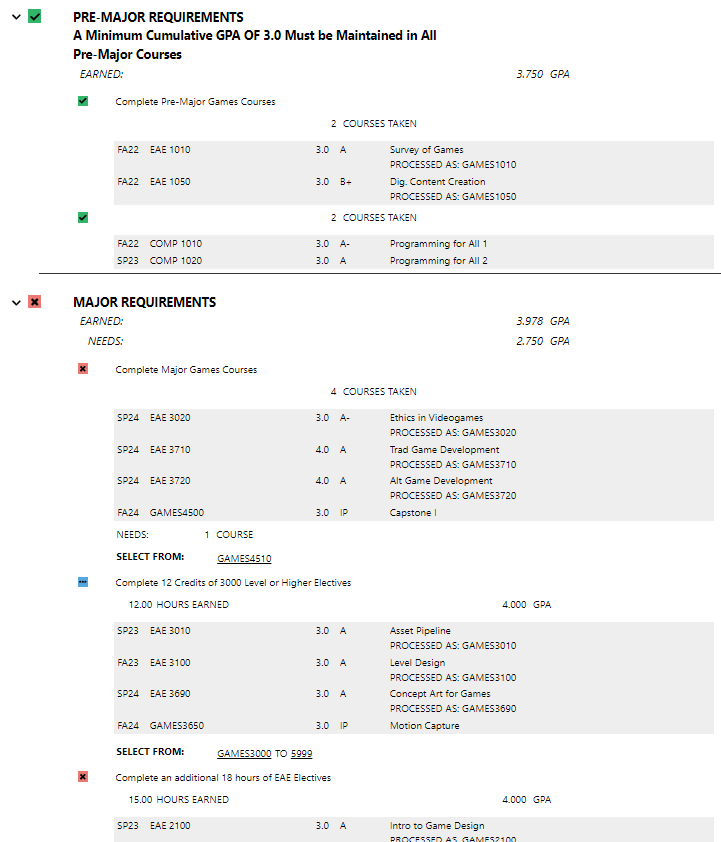
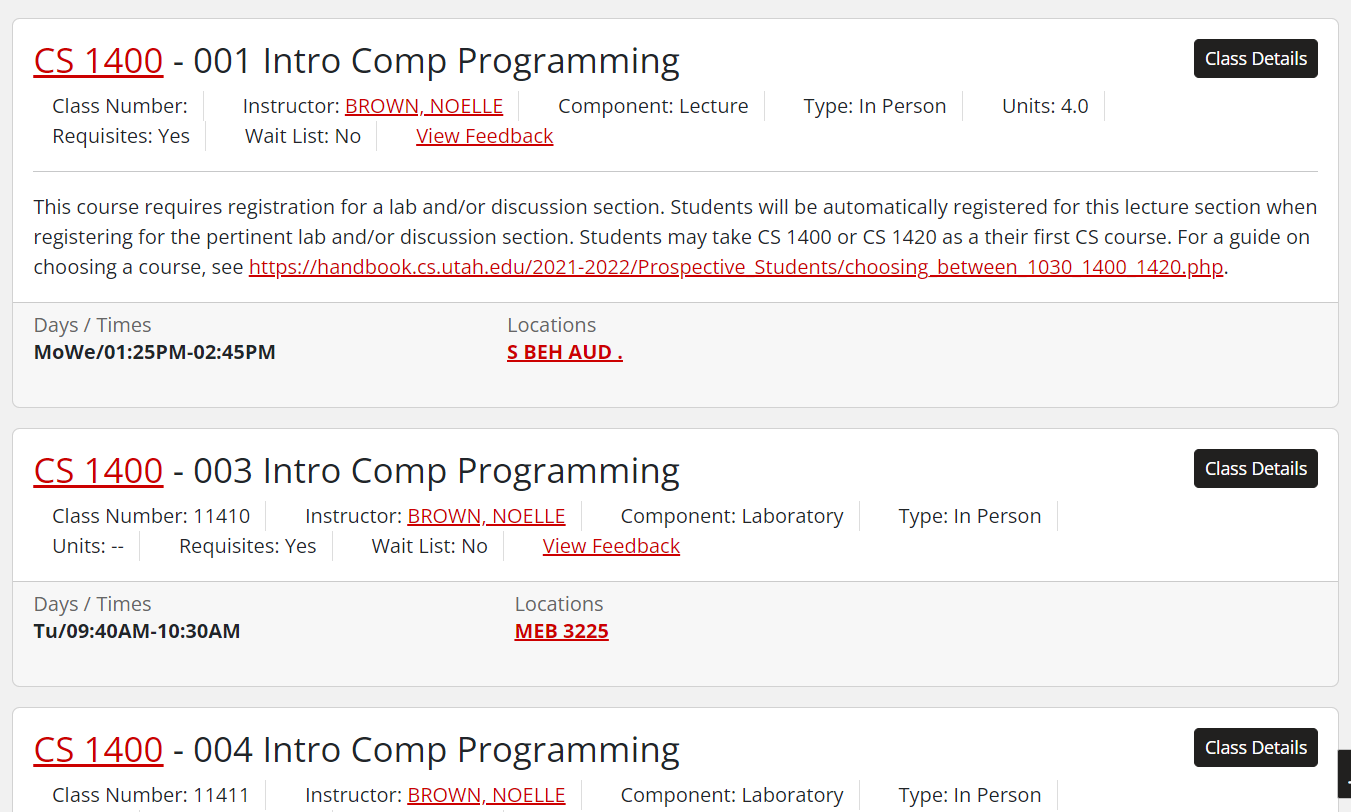
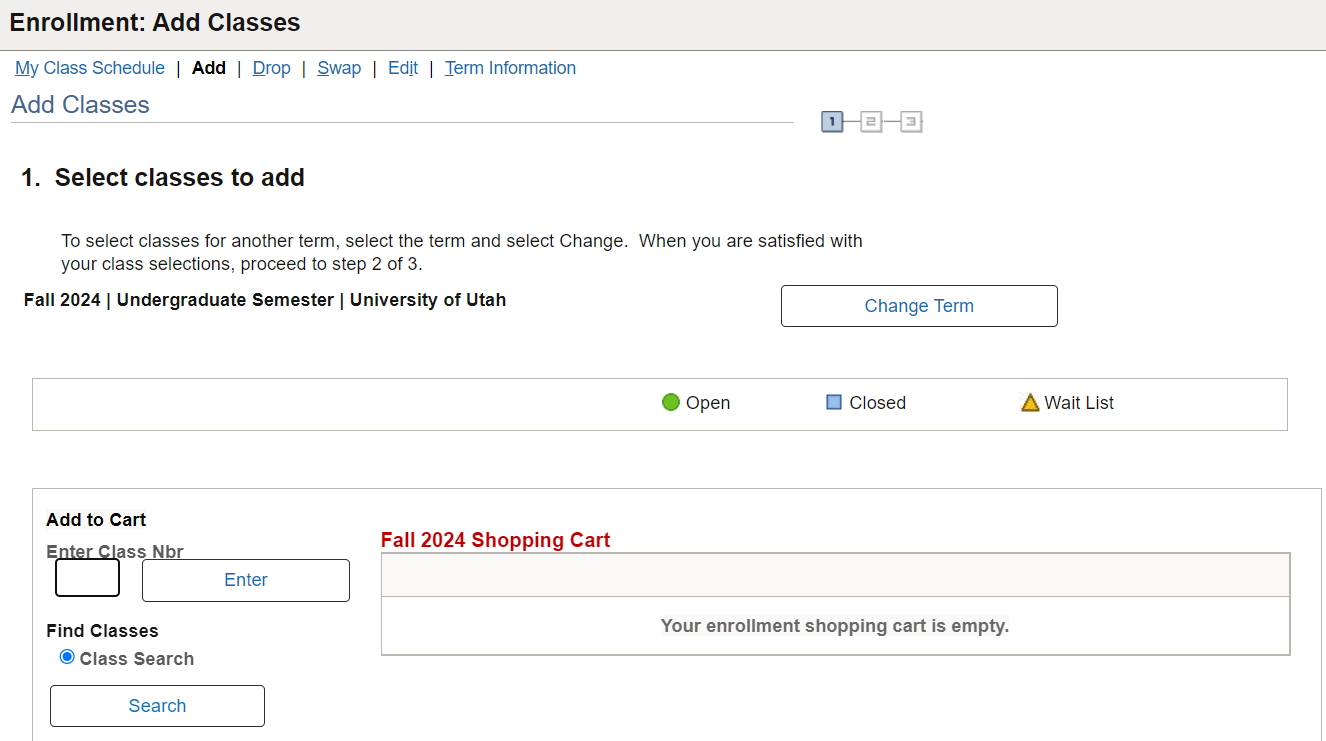
Students typically need to juggle at least three tabs just to enroll in a class:
Degree Audit: to track academic progress and required courses
Course Information: to check class availability for the current semester
Enrollment: where they manually enter course numbers from the Course Info tab to register
Solution:
Decrease the Number of Tabs
However, there's more to it than that. I need to find a way to include all the important information from the three tabs into one. I've decided to use Degree Audit as the main tab and collapse the other two into this one because I feel that without this tab, the student cannot proceed to any other tab.
Problem and Solution
-
0
1
Problem:
Huge Amount of Tab Requirements
Students typically need to juggle at least three tabs just to enroll in a class:
Degree Audit: to track academic progress and required courses
Course Information: to check class availability for the current semester
Enrollment: where they manually enter course numbers from the Course Info tab to register
Solution:
Decrease the Number of Tabs
However, there's more to it than that. I need to find a way to include all the important information from the three tabs into one. I've decided to use Degree Audit as the main tab and collapse the other two into this one because I feel that without this tab, the student cannot proceed to any other tab.
Problem and Solution
-
0
1
Problem:
Huge Amount of Tab Requirements
Students typically need to juggle at least three tabs just to enroll in a class:
Degree Audit: to track academic progress and required courses
Course Information: to check class availability for the current semester
Enrollment: where they manually enter course numbers from the Course Info tab to register
Solution:
Decrease the Number of Tabs
However, there's more to it than that. I need to find a way to include all the important information from the three tabs into one. I've decided to use Degree Audit as the main tab and collapse the other two into this one because I feel that without this tab, the student cannot proceed to any other tab.
Degree Audit Page
+
Course Information Page
+
Enrollment Page
=
Prototype
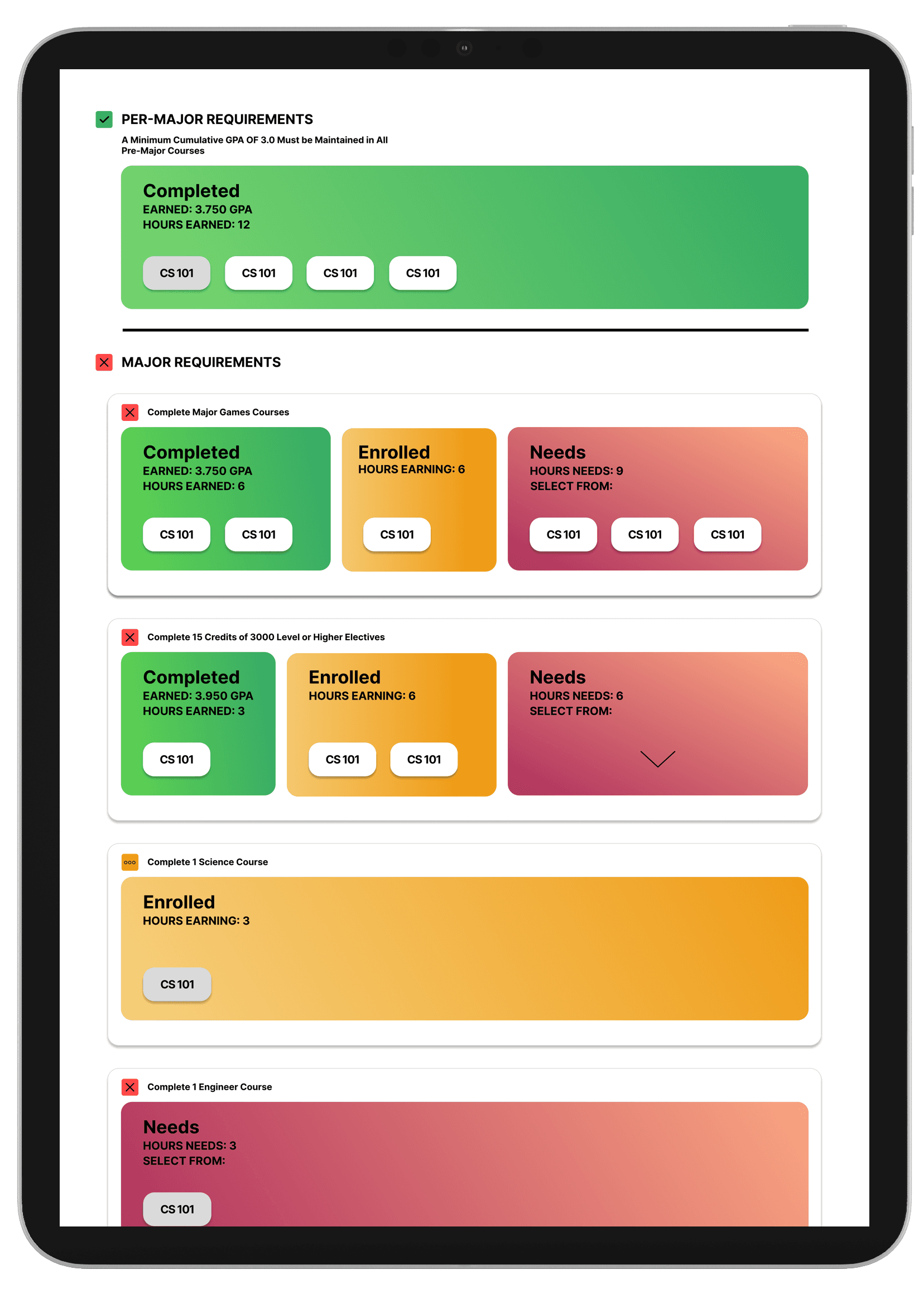
The next step is to redesign the Degree Audit, allowing users to interact with the courses beyond just text.

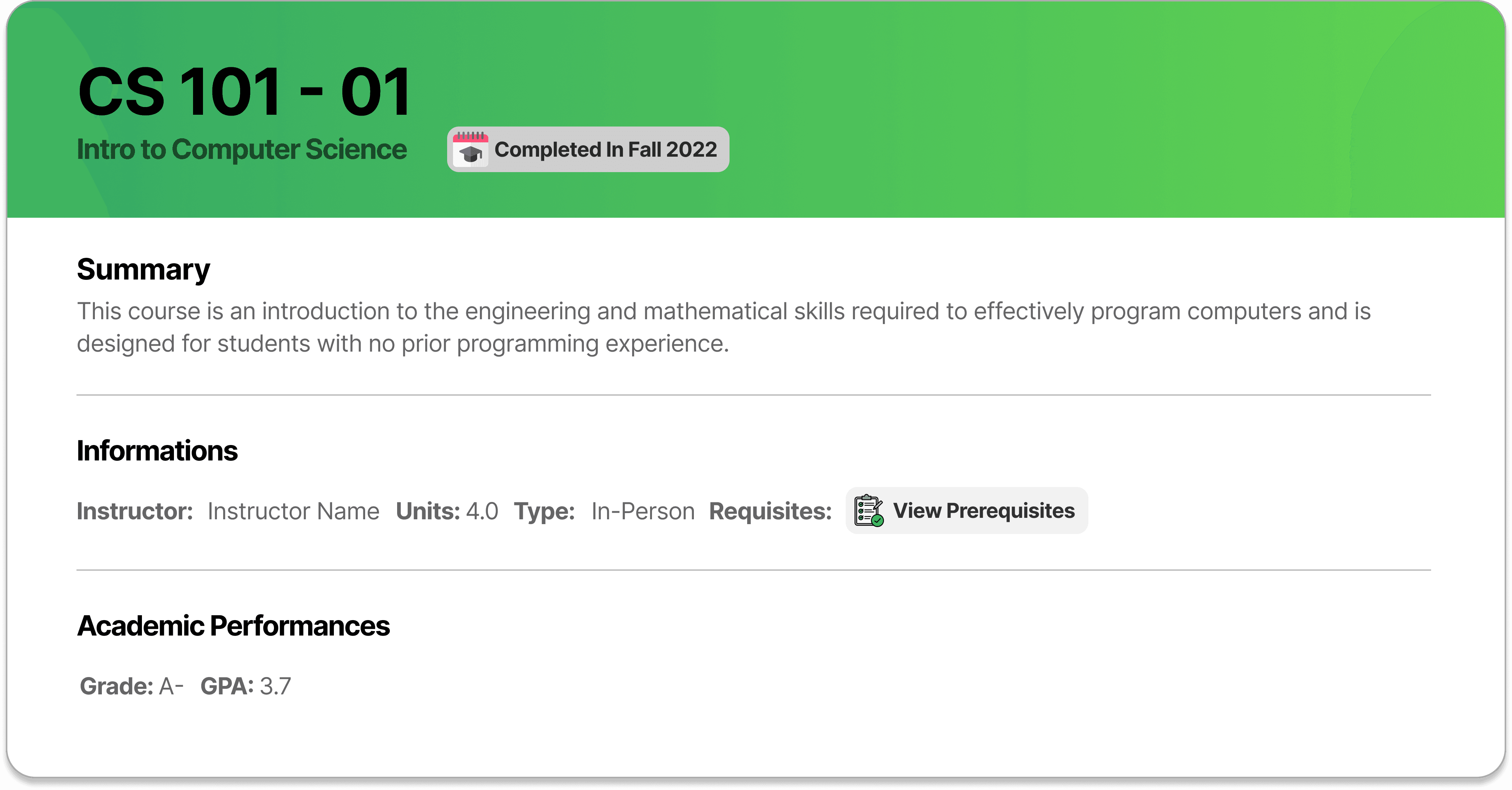
Complete
When students interact with the complete class, they can view the date of course completion, academic performance, and course information.
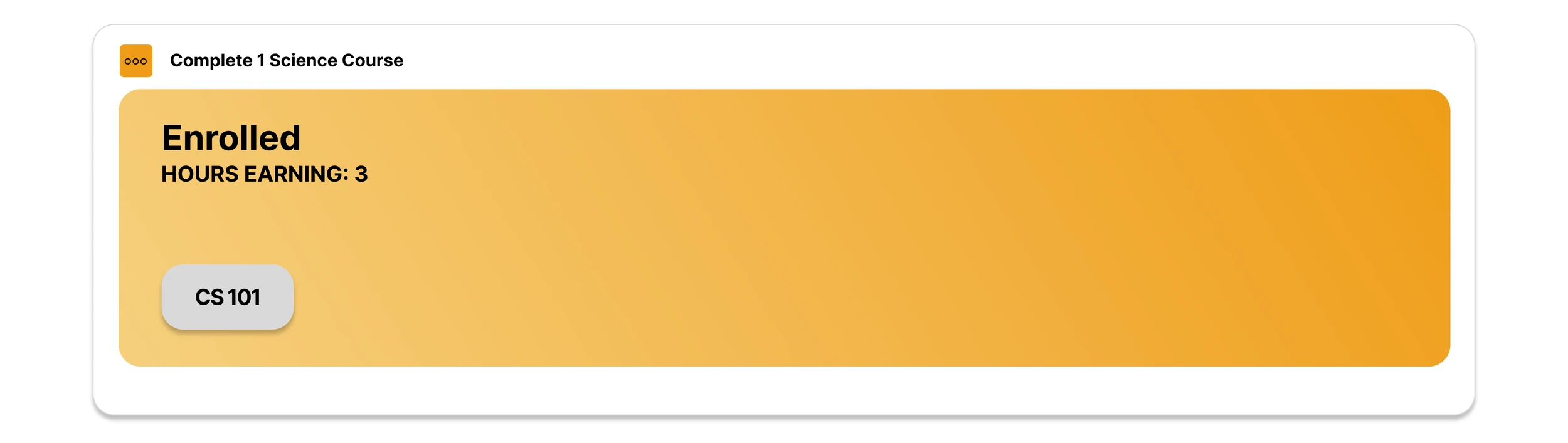
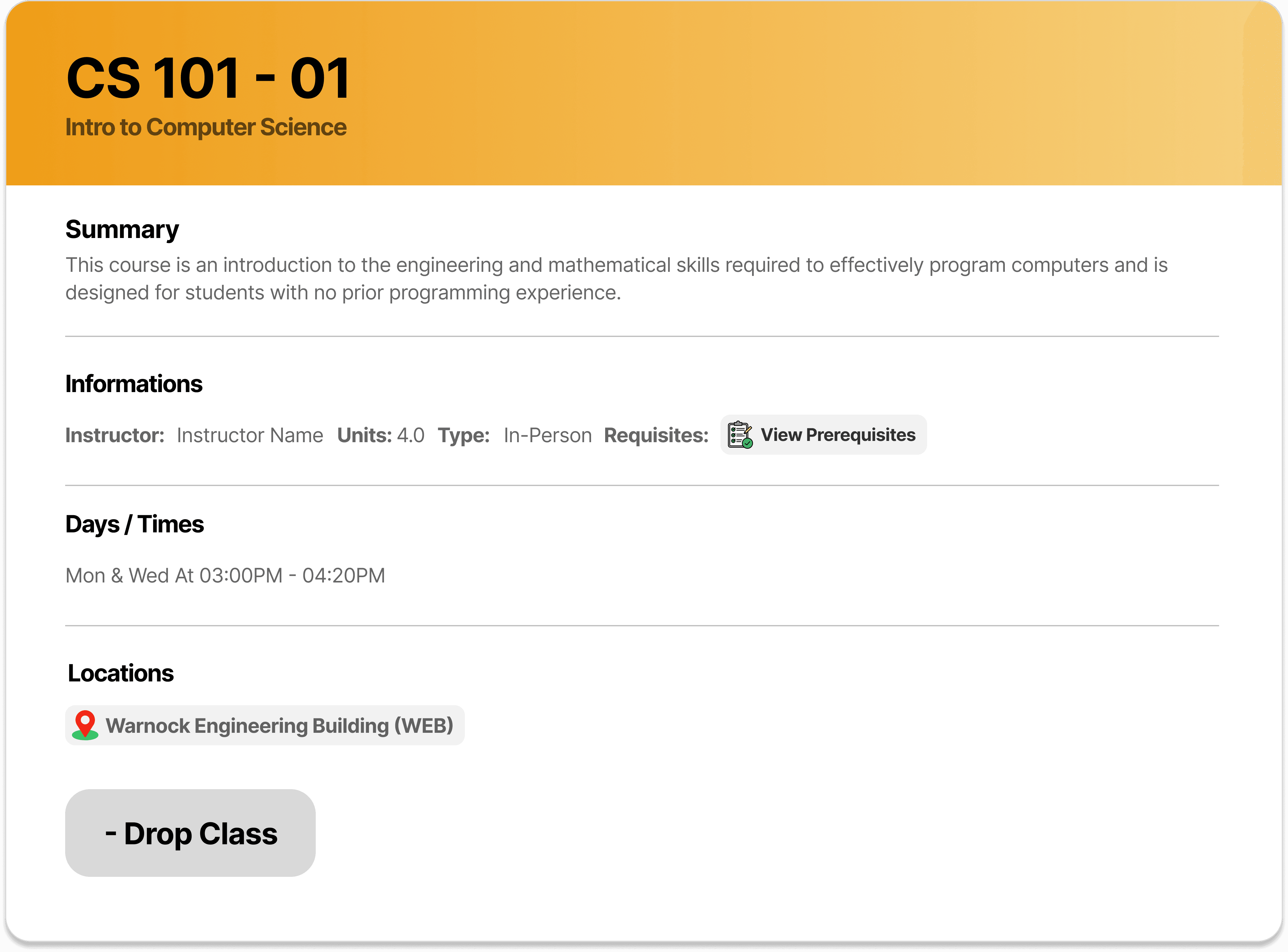
Enrolled
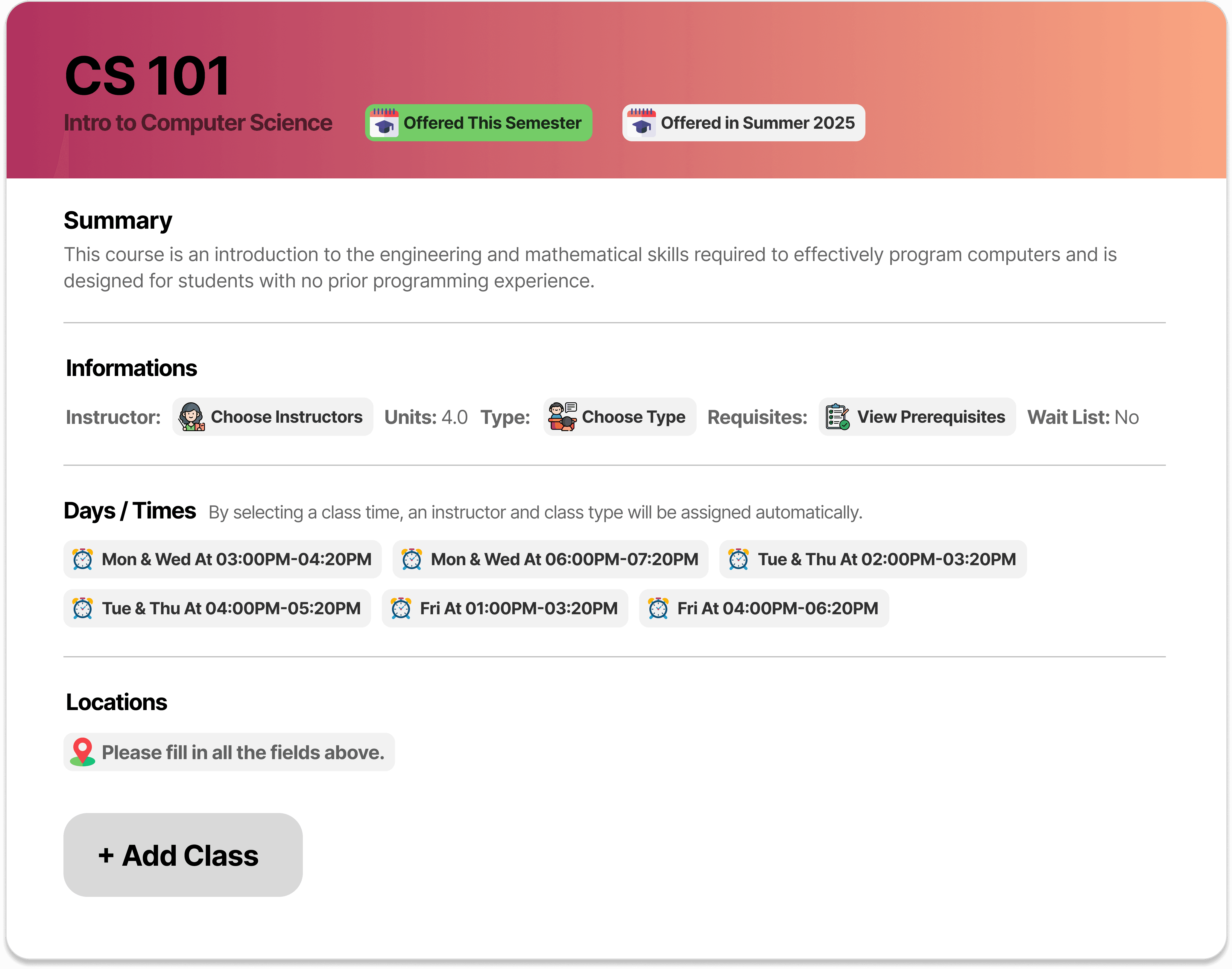
When students interact with the enrolled class, they can view the course information, such as location, days & times, instructor, and more, and they can choose to drop the class.
Needed
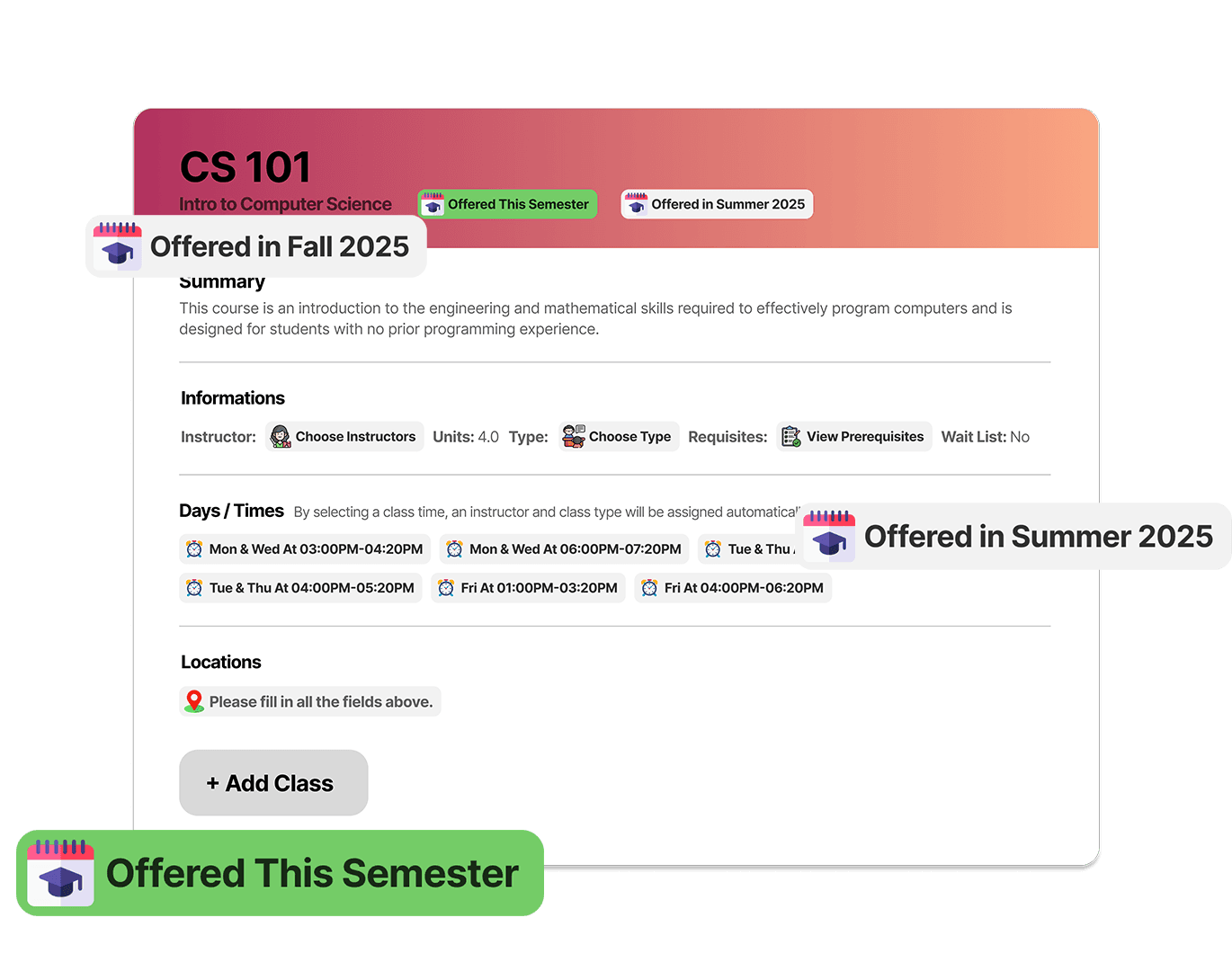
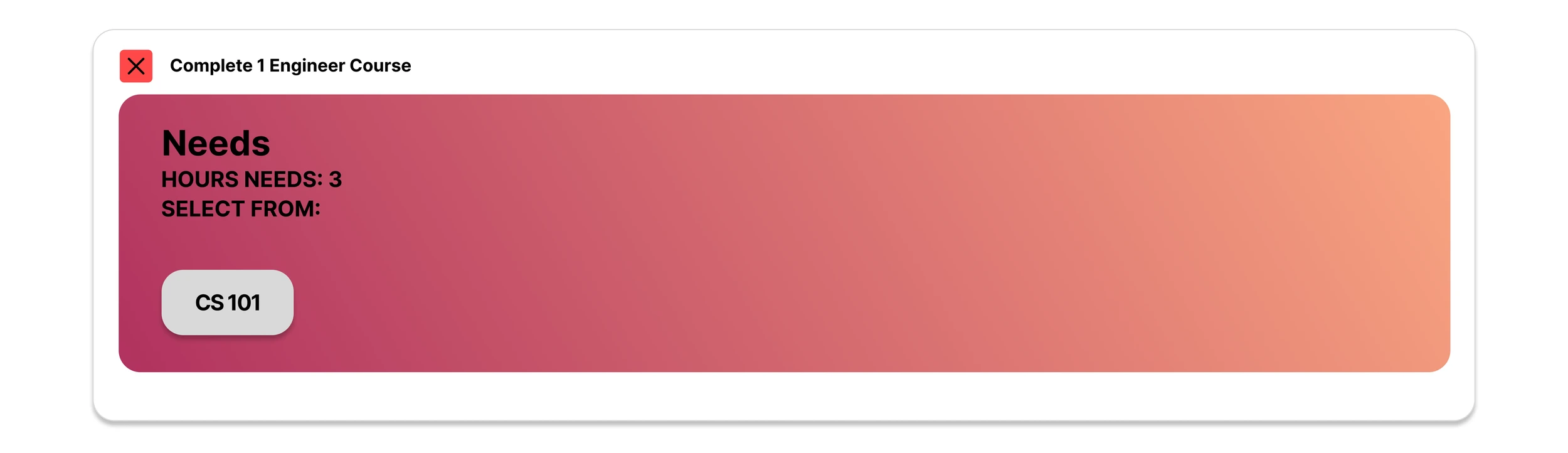
When students interact with the Needed class, they have the option to choose before they can enroll in the course, such as choosing instructors, course type, or selecting their preferred time, which will automatically fill up the information above for them. Students can view when this course is available for them to enroll, which will show up to only three semesters.
With this new design, students can now access all the main functions of the three tabs in just one tab! The last step is to click 'Schedule Builder' at the top right of the page, students can easily finalize their schedule.

Problem and Solution
-
0
2
Problem:
Complexity of Degree Audit
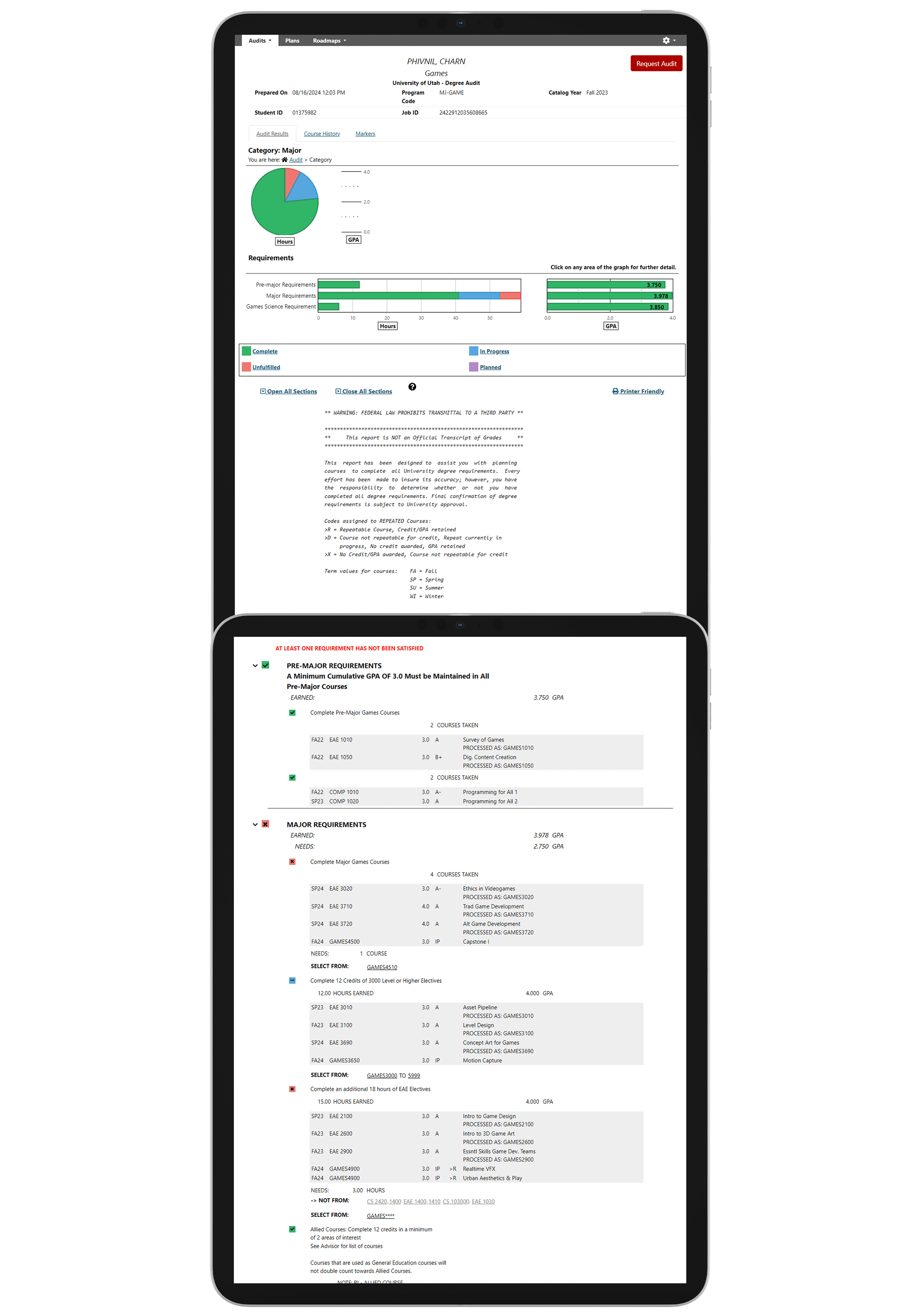
The degree audit interface is overly complex. Most of the complexity comes from having only a big chunk of text.
Solution:
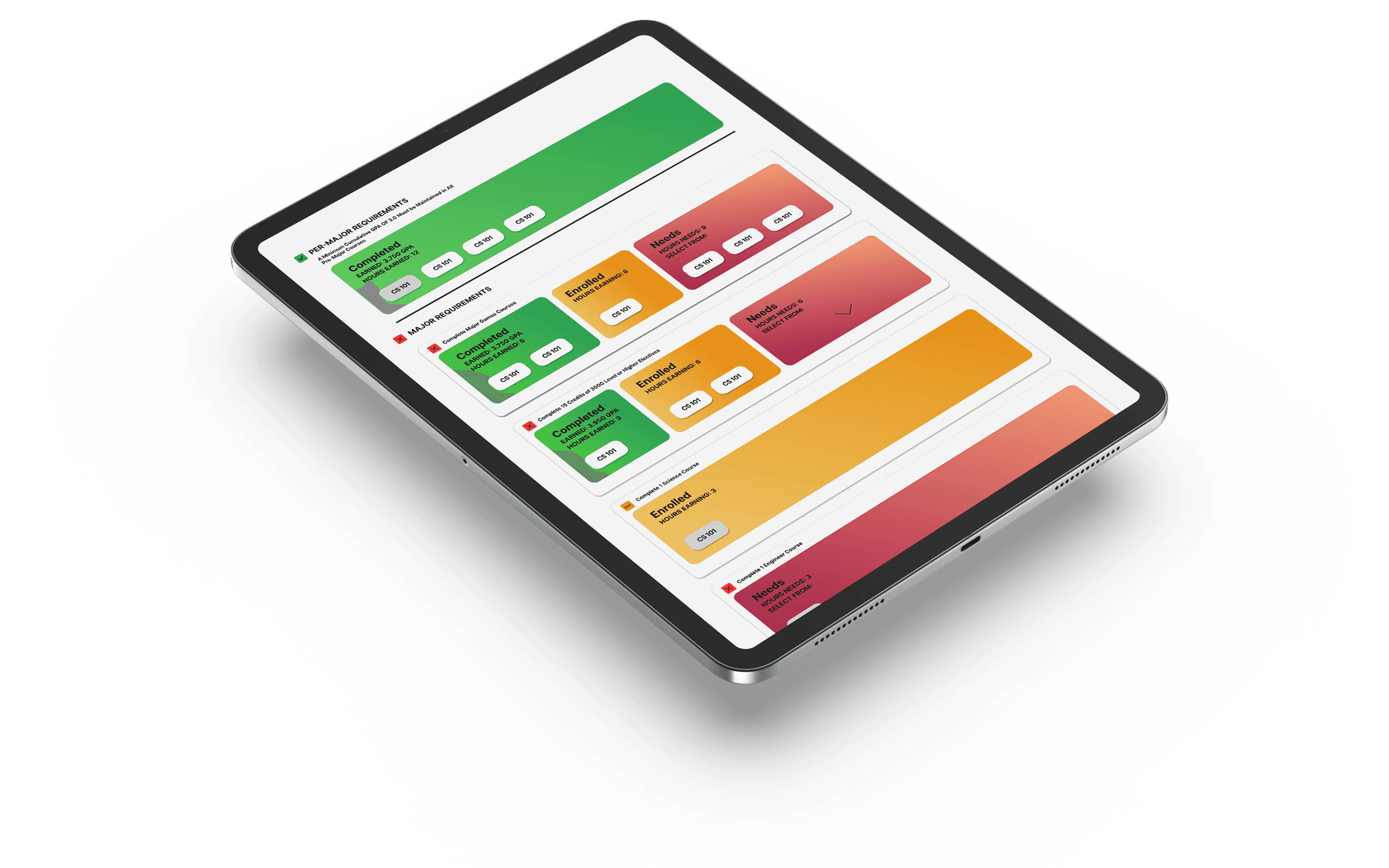
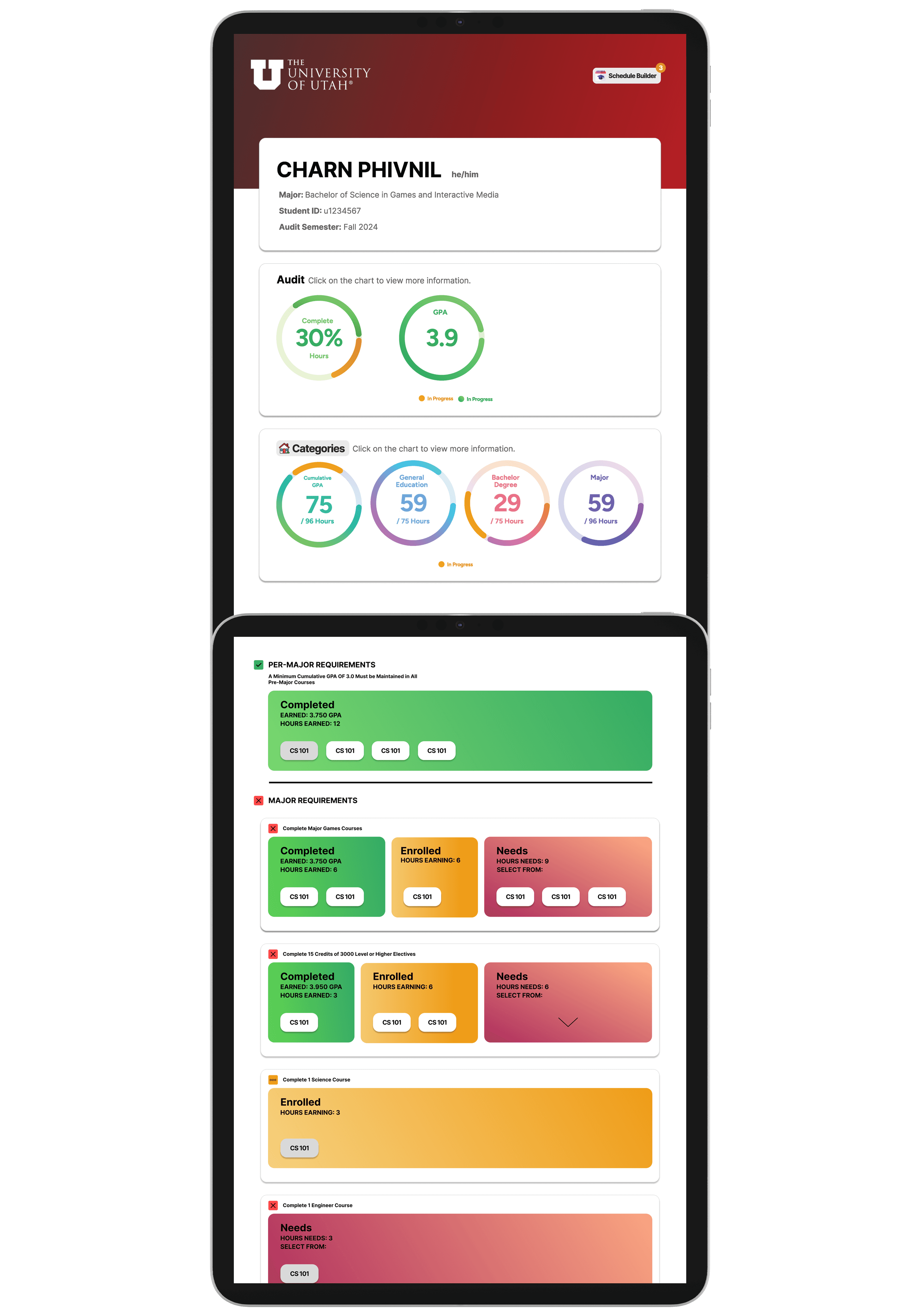
Replaced Dense Text with Visual Elements
This made the site cleaner, more engaging, and easier for students to navigate, while still communicating the same content effectively.
Problem and Solution
-
0
2
Problem:
Complexity of Degree Audit
The degree audit interface is overly complex. Most of the complexity comes from having only a big chunk of text.
Solution:
Replaced Dense Text with Visual Elements
This made the site cleaner, more engaging, and easier for students to navigate, while still communicating the same content effectively.
Problem and Solution
-
0
2
Problem:
Complexity of Degree Audit
The degree audit interface is overly complex. Most of the complexity comes from having only a big chunk of text.
Solution:
Replaced Dense Text with Visual Elements
This made the site cleaner, more engaging, and easier for students to navigate, while still communicating the same content effectively.
Before
After
Problem and Solution
-
0
3
Problem:
Psychological Impact of Progress Bar
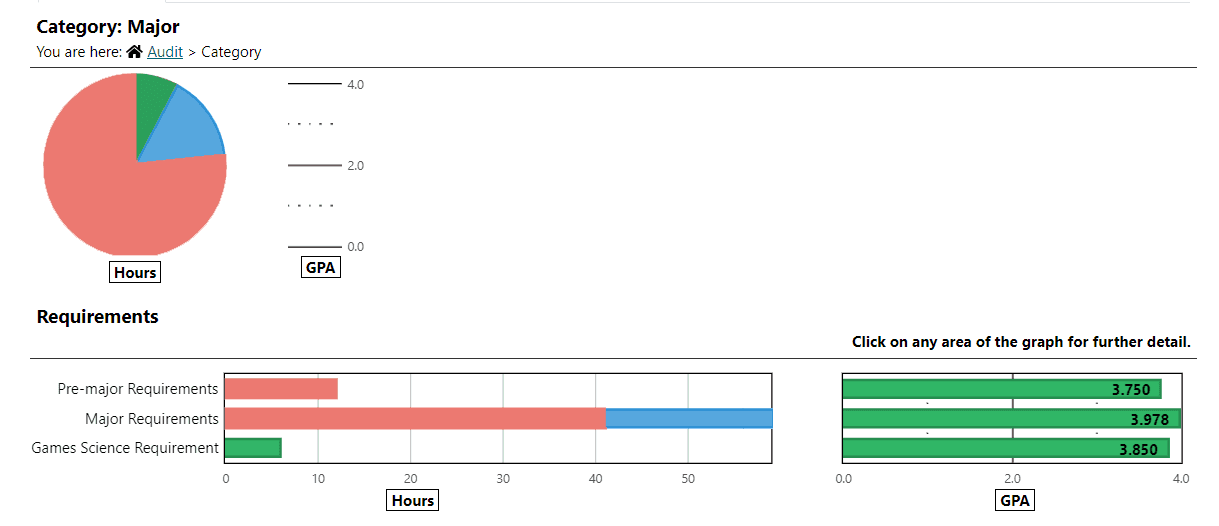
Students’ progress bar displays a large amount of red (especially when they are in their first year), which makes the student feel distant from achieving their graduation goals.
Solution:
Removed Red from the Progress Bar
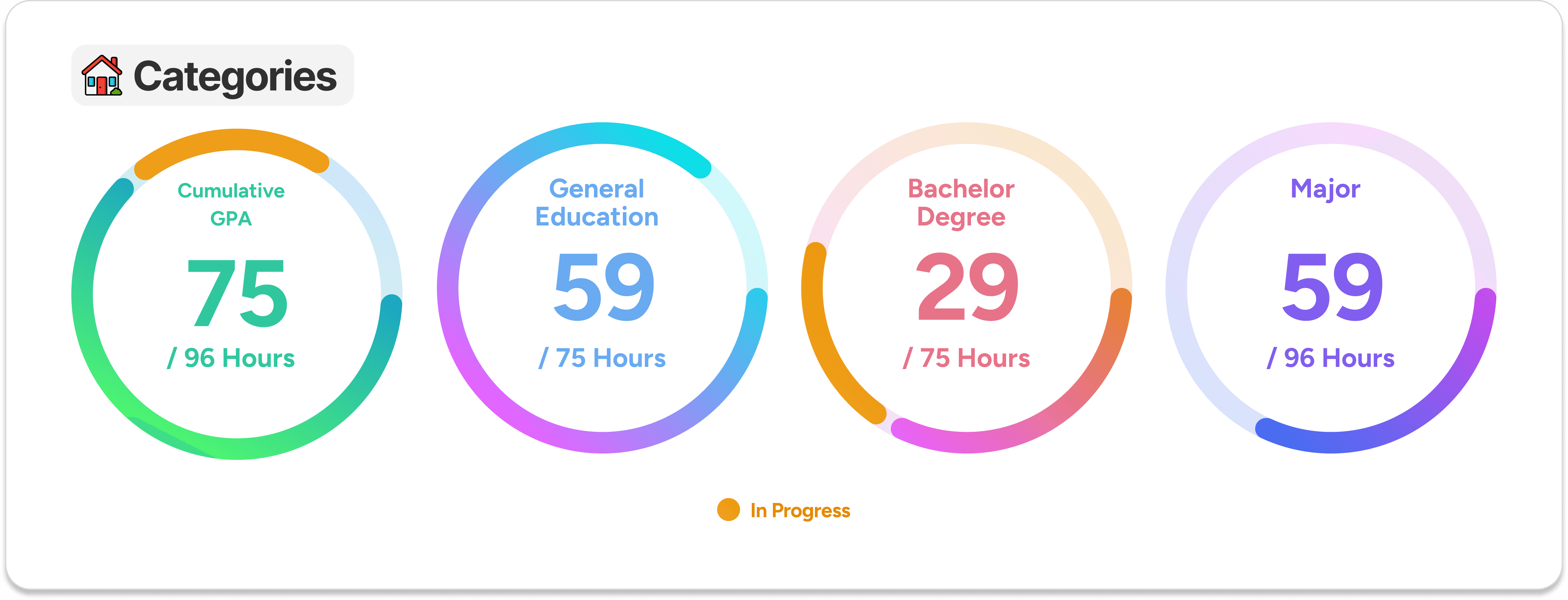
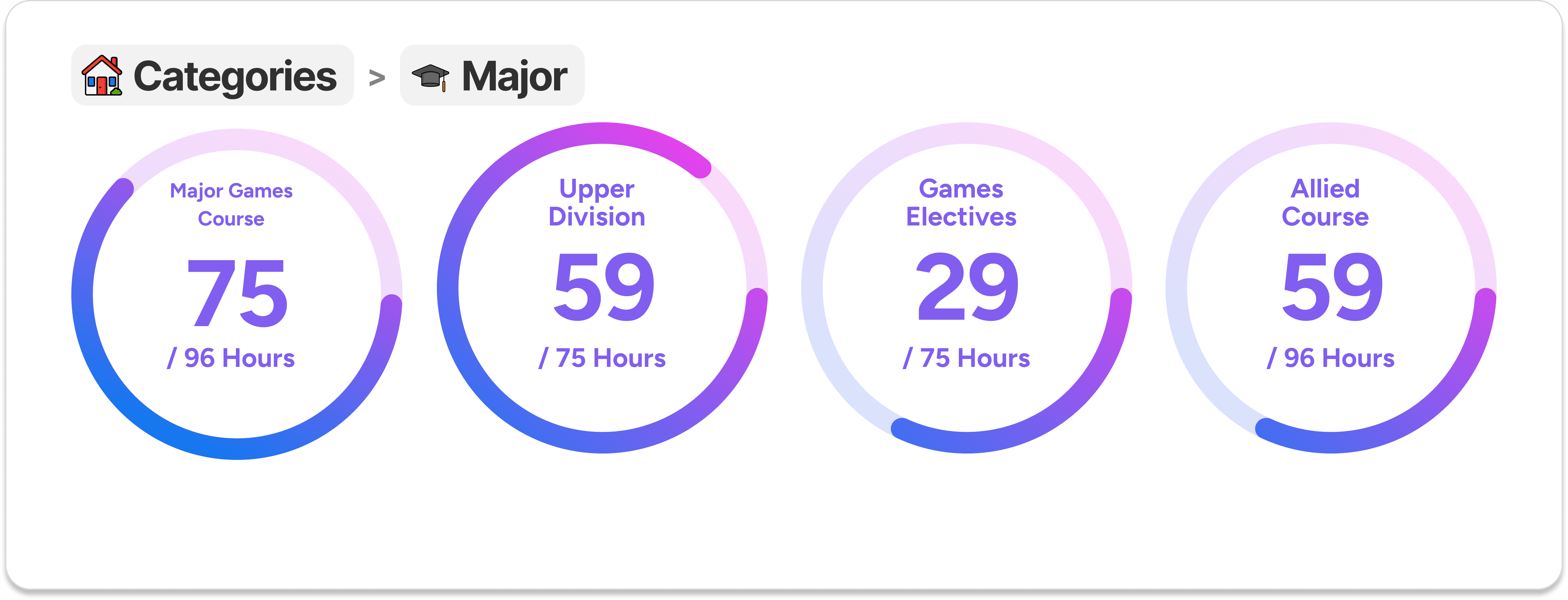
To avoid discouraging students, The new design uses two colors: one to show category progress and yellow to highlight enrolled classes, keeping the experience both informative and encouraging.
Problem and Solution
-
0
3
Problem:
Psychological Impact of Progress Bar
Students’ progress bar displays a large amount of red (especially when they are in their first year), which makes the student feel distant from achieving their graduation goals.
Solution:
Removed Red from the Progress Bar
To avoid discouraging students, The new design uses two colors: one to show category progress and yellow to highlight enrolled classes, keeping the experience both informative and encouraging.
Problem and Solution
-
0
3
Problem:
Psychological Impact of Progress Bar
Students’ progress bar displays a large amount of red (especially when they are in their first year), which makes the student feel distant from achieving their graduation goals.
Solution:
Removed Red from the Progress Bar
To avoid discouraging students, The new design uses two colors: one to show category progress and yellow to highlight enrolled classes, keeping the experience both informative and encouraging.
Before
Home Categories and Sub Categories looks the same
After
Home Categories
Sub Categories
Unnecessary Information
-
0
4
Problem:
Psychological Impact of Progress Bar
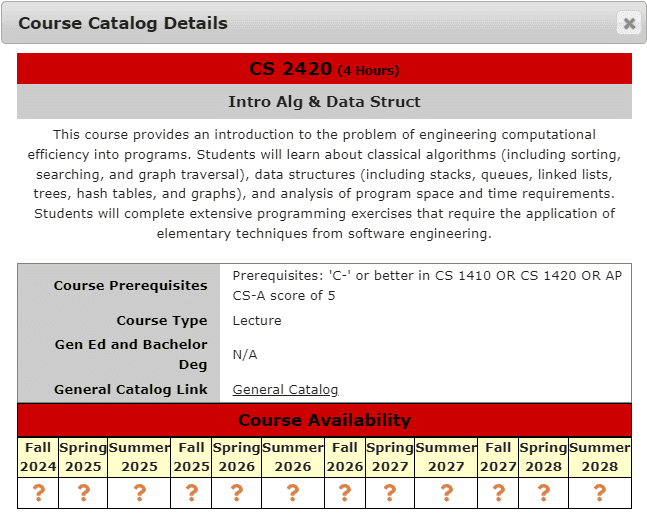
Displaying course availability for up to 10 semesters in advance is unnecessary, as most students focus on the current or upcoming semester.
Solution:
Removed Long-term Listings
Survey results showed that most students only care about classes offered within the next three semesters, with most focusing on just the upcoming one. Based on this, I removed long-term listings and kept the display limited to the next three semesters.
Unnecessary Information
-
0
4
Problem:
Psychological Impact of Progress Bar
Displaying course availability for up to 10 semesters in advance is unnecessary, as most students focus on the current or upcoming semester.
Solution:
Removed Long-term Listings
Survey results showed that most students only care about classes offered within the next three semesters, with most focusing on just the upcoming one. Based on this, I removed long-term listings and kept the display limited to the next three semesters.
Unnecessary Information
-
0
4
Problem:
Psychological Impact of Progress Bar
Displaying course availability for up to 10 semesters in advance is unnecessary, as most students focus on the current or upcoming semester.
Solution:
Removed Long-term Listings
Survey results showed that most students only care about classes offered within the next three semesters, with most focusing on just the upcoming one. Based on this, I removed long-term listings and kept the display limited to the next three semesters.
Before
After